Calculate Connectivity
You can use the volume labels generated by SVREG with the fibers generated above in order to explore the connectivity of different brain regions. Go to File > Open > Label Volume… and load fileprefix.svreg.label.nii.gz (or, if you ran SVREG with refinement, fileprefix.svreg.corr.label.nii.gz). Next, open the “Connectivity” tab of the Diffusion toolbox and click “Compute Connectivity.” After a few moments of calculation, you will have a circle graph of the connectivity of brain regions with each other.
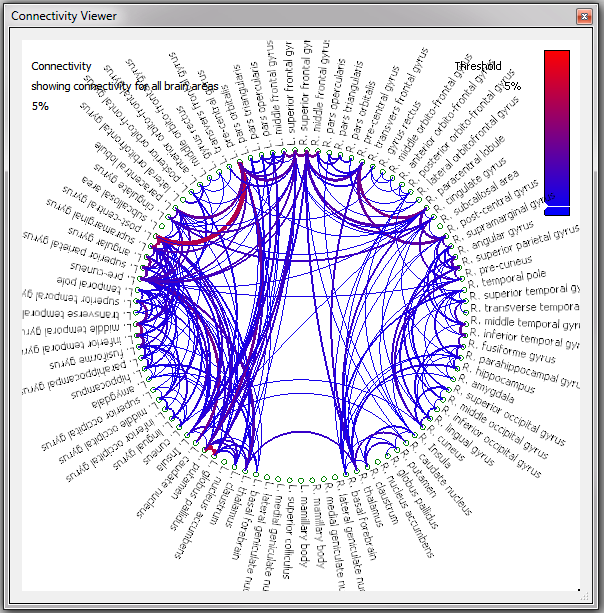
Clicking on a region name in the graph will update the surface view to only show those fibers passing through that area; clicking another label while holding down the
| Connectivity Viewer | |
|---|---|
| Key | Action |
| 1 | Show Connectivity for Cortical Areas |
| 2 | Show Connectivity for Frontal Lobe |
| 3 | Show Connectivity for Parietal Lobe |
| 4 | Show Connectivity for Temporal Lobe |
| 5 | Show Connectivity for Occipital Lobe |
| 6 | Show Connectivity for Subcortical Areas |
| 7 | Show Connectivity for Brain Areas |
| 8 | Show Connectivity for All Labeled Regions (includes white matter, ventricles, etc). |